A Claude Code plugin · betaClaude Code プラグイン · beta

You set the vision.
Banto runs the development.
方針はあなたが決める。
開発は番頭が回す。

A self-driving harness for Claude Code. A harness is the layer that holds your context and drives the agent in your place. It keeps your decisions, research, and work-in-progress in a store, and re-injects them at every session start. Even after /clear, nothing is forgotten. Hooks stop pushes to main and production changes before they run. The only thing that reaches you is an exception worth deciding.

Claude Code のための自走ハーネス。ハーネスとは、AI に方針と記憶を持たせ、 あなたの代わりに走らせる土台のことだ。設計判断・調査・作業の続きをストアに残し、 セッションを開くたびに注入する。/clear しても「前に決めたこと」を忘れない。 main への push や本番操作は hook が実行前に止める。あなたに届くのは、 判断の要る例外だけ。

$ claude plugin marketplace add banto-org/banto click to copyクリックでコピー
0skillsスキル
0agentsエージェント
0hooksフック
0rulesルール
0MCP bundled同梱 MCP

The bantō contract番頭の契約

A head clerk for your AI sessions AI セッションの筆頭奉公人

A bantō (番頭) was the head clerk of an Edo-period merchant house. The owner set the direction; the bantō ran everything end to end and brought only the exceptions back to the owner. Banto applies that exact contract to software. The modern bantō doesn't run a shop. It runs your development.

番頭とは、江戸時代の商家で主人に代わって店のすべてを切り盛りし、 例外だけを主人に上げた筆頭の奉公人のこと。Banto はその契約をそのまま 受け継ぐ。現代の番頭が動かすのは店ではない。動かすのはあなたの開発だ。

In an era where AI pushes the cost of building toward zero, the moat (the durable edge that keeps out competitors) moves from execution to vision + empathy. Banto is not a "dev workflow tool." It is a harness that maximizes the leverage of one human commanding N AI sessions.

AI が「作るコスト」をゼロに近づける時代、競争優位(moat)は実行からビジョンと共感へ移る。 Banto は「開発ワークフローツール」ではない。一人の人間が N の AI セッションを率いる、 そのレバレッジを最大化するハーネス。

Concretely: say "start the payment redesign" and a branch and workspace open, then spec → build → verify runs on its own. You are called only twice. Once when the spec forks, and once right before anything lands on main.

具体的にはこう動く:「決済のリデザインを始める」と言えば、ブランチと作業場が開き、 仕様 → 実装 → 検証が自分で回る。あなたが呼ばれるのは 2 回だけだ。1 回目は仕様の解釈が 割れたとき、2 回目は main に入れる直前だ。

"Humans never think about invocation; the harness self-drives; exceptions arrive only as checkpoints." 「人間はスキルの起動を意識しない。ハーネスが自走する。例外だけがチェックポイントとして届く。」
— the North Star— 北極星

The three flagships3 つの目玉

Where Banto earns its keep Banto の真価が出るところ

Everything below is real and shipping. These three are the ones to look at first.

以下はすべて実装済み(beta 公開中)。まず見るべきはこの 3 つ。

01

ai-context-store

Knowledge that survives sessions. Your repo stays clean.

セッションを跨いで生きる知識。repo は汚れない。

Decisions, research, and checkpoints live in a central knowledge store (~/ai-context-store/<project>/), not in your repo. They are re-injected at every session start, so context never dies with a /clear or a compaction. Knowledge goes to the store; code stays in the repo.

決定ログ・調査・チェックポイントは repo ではなく中央知識ストア (~/ai-context-store/<project>/) に置く。セッション開始ごとに 再注入されるため、/clear や自動圧縮で文脈を失わない。 知識はストアに集約され、コードは repo にとどまる。

  • Claude-native internal search — query expansion + ranking over everything accumulated
  • Claude ネイティブの内部検索 — 蓄積した全てにクエリ展開 + ランキング
  • A stable directory layout — a fixed home that any tool can read
  • 安定したフォルダ構成 — どのツールからも読める、決まった置き場所
  • decisions / docs / research / sessions / workspaces
  • decisions / docs / research / sessions / workspaces
Read the deep-dive — what's inside & how it wires into Claude Code →詳しい解説 — 中身と Claude Code 連携の仕組み → See the evidence — 5 benchmarks, 42 cells →実測を見る — 5 ベンチマーク・42 セル → Store Search — every store, one query, no server →Store Search — 全ストアをクエリ 1 本で、サーバなし →
02

ws — workspace & fleetワークスペース & 艦隊運用

A 3-tier branch model and parallel sessions, driven by intent.

3 階層ブランチと並走セッションを、インテントで駆動。

Topic-based workspaces sit on a 3-tier branch model (main ← epic ← task worktree), orchestrated via git-town. You don't run git commands; you state intent ("start the payment redesign", "this work is done", "ship it") and Banto opens branches, isolates worktrees, merges, syncs, and cleans up.

トピック別ワークスペースが main ← epic ← task worktree の 3 階層ブランチ (git-town 委譲)の上に乗る。git コマンドは打たない。インテント(「決済のリデザインを 始める」「この作業終わった」「main に入れて」)を述べるだけでいい。Banto がブランチを開き、 worktree を分離し、マージ・sync・掃除まで自動で回す。

  • Worktree isolation lets multiple agents run in parallel without colliding
  • worktree 分離で複数エージェントが衝突せず並走
  • A session registry with collision detection for the fleet (the set of agent sessions running in parallel)
  • 艦隊(並走させる複数セッション全体)向けの衝突検知付きセッションレジストリ
  • Irreversible / outward actions (ship, push, PR) always stop at a human gate
  • 不可逆・外向き操作(ship / push / PR)は必ず人間ゲートで止まる
03

set-language — a reusable i18n method再利用できる i18n 方式

One canonical language, generated translations, a deterministic sync gate. Copy this pattern.

正本は 1 言語、翻訳は生成、同期は決定論ゲート。この型をそのまま真似できる。

Banto ships Japanese-canonical skills and auto-generated English ones, kept in lock-step by a hash manifest. The trick is the determinism split: translation is delegated to an LLM (non-deterministic), but verifying that the translation is current is fully deterministic. That is the whole method.

Banto は 日本語を正本英語を自動生成とし、ハッシュ マニフェストで同期を取る。鍵は決定論の分離だ。翻訳は LLM に委譲 (非決定論)するが、その翻訳が最新かどうかの検証は完全に決定論だ。 これが方式の全てだ。

A

One canonical source

正本は 1 つ

Skills, agents, and rule templates are authored once, in Japanese (i18n/ja/). It is the single source of truth. Every other language is downstream of it.

スキル・エージェント・ルールテンプレートは日本語で一度だけ書く(i18n/ja/)。これが唯一の正本だ。他の言語はすべてその下流にある。

B

Generate, don't hand-maintain

手で保守せず生成する

i18n-gen.sh hashes each canonical file. When a hash drifts, it calls an LLM translator under a strict contract: never touch YAML keys, code fences, paths, or commands. It does localize trigger phrases.

i18n-gen.sh が正本をハッシュし、ズレたファイルだけ LLM 翻訳を呼ぶ。契約は厳格だ。YAML キー・コードフェンス・パス・コマンドには触れない。トリガー文だけは自然な言い回しに直す。

C

Verify deterministically

検証は決定論で

The translation is fuzzy, but i18n-sync-check.sh is exact: it compares sha256 hashes in .sync-manifest.json and fails CI on STALE / MISSING / TAMPERED / ORPHAN. A second gate, i18n-coverage-check.sh, classifies every shipped file as i18n-managed or explicitly exempt. Nothing slips in by omission. No LLM in either gate.

翻訳は曖昧でも、i18n-sync-check.sh は厳密だ。.sync-manifest.json の sha256 を突き合わせ、STALE / MISSING / TAMPERED / ORPHAN で CI を落とす。もう 1 つのゲート i18n-coverage-check.sh は、配布ファイルを全数分類し、i18n 管理か明示 exemption のどちらかに必ず入れる。見落としで混ざる経路がない。どちらのゲートにも LLM はいない。

D

Swap, and make it stick

切り替えて、固定する

/set-language ja|en materializes the chosen tree onto the active set and saves the choice in user scope. A SessionStart hook re-applies it after every plugin update. The choice survives.

/set-language ja|en が選んだ言語を active セットへ展開し、選択を user スコープに保存する。SessionStart hook がプラグイン更新のたびに再適用する。選択は生き残る。

This pattern is worth copying. Most i18n setups hand-maintain every locale, and it drifts silently. Others trust an LLM to keep translations in sync, but that isn't verifiable. Banto separates the two: the LLM translates, and a hash gate proves freshness. This page runs on the same idea: one set of content, a toggle, and both languages always present.

この型は真似する価値がある。 多くの i18n は各ロケールを手で保守し、 黙ってズレていく。あるいは LLM に「同期しといて」と委ねるが、それでは検証できない。 Banto は両者を分ける。翻訳は LLM に任せ、鮮度の証明はハッシュゲートに任せる。 このページ自身も同じ発想だ。コンテンツは 1 組、トグルは 1 つ、両言語が常に在る。

Folding a sessionセッションを畳む

save-checkpoint — fold a long session without losing the thread save-checkpoint — 長い会話を、筋を失わずに畳む

A long session bloats context and gets expensive. save-checkpoint writes a structured, resumable snapshot to the store, then recommends exactly one of compact or clear, never both. It never runs either command itself.

会話が伸びるとコンテキストが膨らみ、コストも上がる。save-checkpoint は再開できる 構造化スナップショットを store に書き、compactclear の どちらか一方だけを推奨する。両論併記はせず、どちらも自分では実行しない。

Plain /compact

通常の /compact

An in-session LLM summary compresses the transcript in place. Drops happen silently, and you can't choose what the summary keeps. Nothing lands on disk, and you stay inside the same window, only partly reclaimed.

会話内で LLM が要約し、その場で圧縮する。欠落は静かに起き、要約の中身は選べない。ディスクには何も残らず、一部しか戻らない同じ窓の中に居続ける。

save-checkpoint + /clear

save-checkpoint + /clear

A purpose-built, structured checkpoint is written to the store. It's durable and reviewable. Then /clear reclaims the full context window (1M tokens), and the next session's SessionStart re-injects the checkpoint. You resume from a curated summary, not a lossy one.

再開のために設計した構造化チェックポイントを store に書く。永続で、あとから読み返せる。その後 /clear でコンテキストウィンドウ(1M トークン)を丸ごと取り戻し、次のセッションの SessionStart が再注入する。欠落した要約ではなく、整えた要約から再開できる。

Idle? It folds itself, in the background放置したら、裏で自動的に畳む

An idle-detection hook cuts the checkpoint for you — not on session end, but when you walk away.

放置検知の hook が、代わりにチェックポイントを切る — セッション終了時ではなく、離席したとき。

A

Armed on every turn

応答ごとにアーム

Each finished response arms a watcher on the transcript. It measures idle time, not wall-clock time. Only the time you're actually away counts toward the threshold.

応答が終わるたび transcript のウォッチャーをアームする。測るのは無操作時間で、覚醒中に離れていた分だけをしきい値に数える。

B

Fires at the cache TTL

キャッシュ TTL で発火

After 5 minutes idle (matching the prompt-cache TTL), it runs /save-checkpoint through a headless claude -p --resume --fork-session. Being a fork, it never writes back to your live session.

無操作 5 分(プロンプトキャッシュの TTL に一致)で、ヘッドレスの claude -p --resume --fork-session/save-checkpoint を回す。fork なので現行セッションには一切書き戻さない。

C

Guarded, not on clean exit

ガード付き・正常終了では動かない

A cleanly ended session disarms the watcher. No checkpoint fires. It fires only on substantial sessions (context >10% or transcript >256KB) and is sleep-aware, so reopening a closed laptop does not trip it.

正常に終えたセッションはウォッチャーを解除する。発火しない。中身のあるセッション(コンテキスト >10% か transcript >256KB)だけが対象で、スリープも考慮するため、閉じたラップトップを開いた瞬間には動かない。

It runs on a cheap model by design. The whole feature exists to save money. When the prompt cache expires, resuming a huge context re-reads every token at cold pricing (the standard per-token rate once the cached discount has lapsed). So the background fork runs on an inexpensive model (sonnet, which resolves to the latest Sonnet), not an expensive one. Filling a fixed checkpoint template from a transcript is faithful-summary work, and sonnet passes that bar in testing. Spending opus here would defeat the very motive the feature was built for.

安いモデルで動くよう設計している。 この機能はコスト削減のために在る。キャッシュが失効した後に巨大なコンテキストを再開すると、コールド価格(キャッシュ割引が切れた後の通常単価)で全トークンを読み直す。だから裏の fork は高額モデルではなく安価な sonnet(最新の Sonnet に解決される)で回す。transcript から定型のチェックポイントテンプレを埋める作業は忠実な要約であり、実測で sonnet がその基準を通過する。ここに opus を使えば、機能の動機そのものを裏切る。

Full save-checkpoint page →save-checkpoint の詳細ページ →

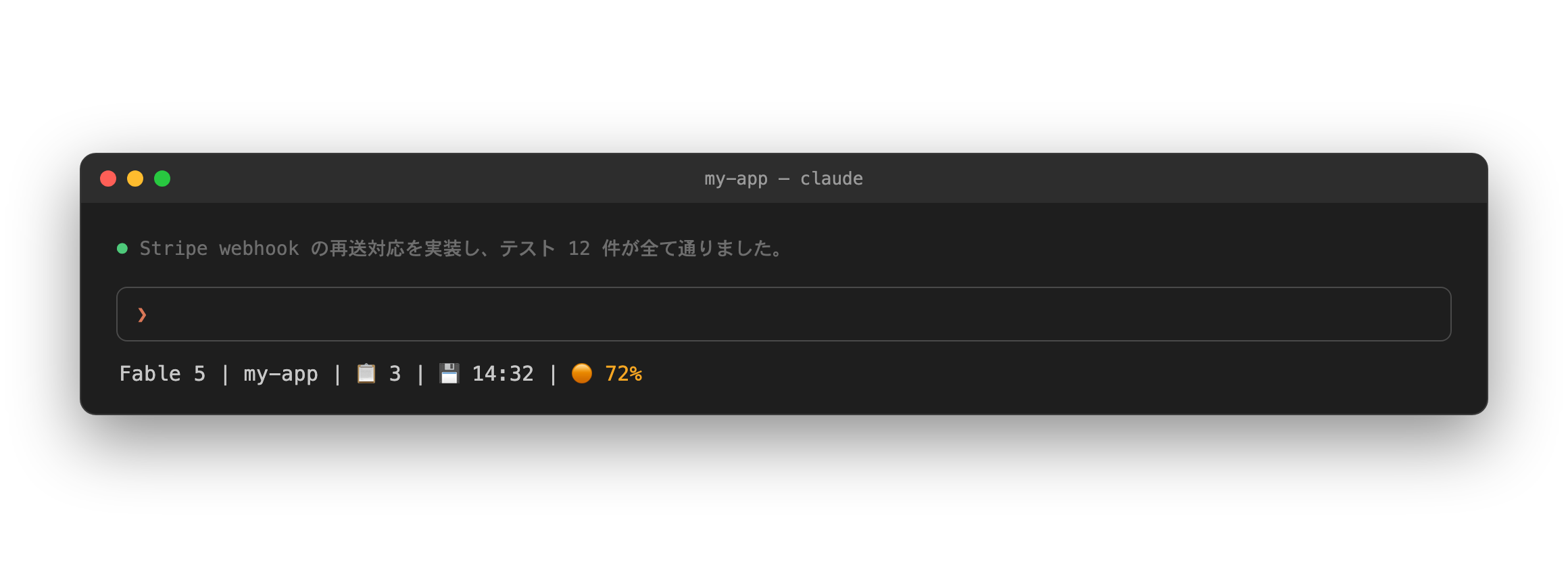
One line under the prompt tells you everything手元の 1 行で、全部わかる

The bundled status line surfaces open tasks, the auto-checkpoint save, and a context-usage warning at a glance. You don't have to ask.

同梱の statusline が、未完了タスク・自動チェックポイント保存・トークン使用量の警告を一目で示す。聞かなくても、見ればわかる。

Claude Code statusline

📋 Open tasks📋 未完了タスク

Counts unfinished items straight from the store's persistent task list (tasks.md). Done items disappear; the number is what's actually left.

store の永続タスクリスト(tasks.md)から未完了だけを数える。完了した項目は消え、残っている数だけが出る。

💾 Auto-checkpoint saved💾 自動チェックポイント保存済み

When the idle / context-pressure checkpoint fires in the background, the save time appears here. So even after walking away and coming back, you know the session is already folded.

放置検知・コンテキスト逼迫の自動チェックポイントが裏で走ると、保存時刻がここに出る。離席して戻っても、もう畳まれていることが見ればわかる。

🟡 Context warning🟡 トークン使用量の警告

Context usage, color-coded as it climbs (40% / 60% / 80%). The same number feeds the hook that recommends folding the session before the window gets expensive.

コンテキスト使用率を段階の色(40% / 60% / 80%)で示す。同じ数値を hook が読み、窓が高くつく前にセッションを畳む推奨につながる。

harness-setup.sh deploys it as part of the harness. An existing custom status line is never overwritten. It renders in the terminal CLI (including terminals inside IDEs) and refreshes on a 10-second timer, so the 💾 mark appears even while you are away.

harness-setup.sh がハーネスの一部として配備する。既にカスタム statusline がある環境は上書きしない。表示されるのはターミナル CLI(IDE 内蔵ターミナル含む)で、10 秒間隔で再描画するため離席中でも 💾 が現れる。

The SDD pipeline (spec-driven development)SDD パイプライン(spec-driven development)

Ideology → spec → autonomous build 思想 → 仕様 → 自走実装

Write down what to build, and what not to build, in CLAUDE.md. Every session judges by it. From a spec, dev-loop splits the work into small tasks and keeps implementing and fixing until every test passes.

「何を作り、何を作らないか」を CLAUDE.md に書き、全セッションの判断基準にする。仕様書ができたら dev-loop が小さなタスクへ分解し、テストが全部通るまで実装と修正を繰り返す。

  1. Decompose分解break a big spec into small tasks大玉を小さなタスクへ
  2. Implement実装write the change変更を書く
  3. Verify検証build & run — no "done" without proofbuild & 実行 — 証拠なき「完了」なし
  4. Fix & repeat修正して反復escalate only the exceptions上げるのは例外だけ

Deterministic safety決定論的な安全

Enforced by hooks, not by promises 約束ではなく hook が強制する

Anything that must never happen is blocked by a deterministic hook before it runs. Nothing here is asked about, and nothing is hoped for. Approvals stay minimal, and the guard rails are mechanical.

起きてはならないことは、実行前に決定論的な hook が遮断する。訊くのでも祈るのでもない。 承認は最小限で、ガードレールは機械的だ。

kill-switch

No direct push to main, no --no-verify, no force-push, no committed secrets. Full stop.

main への直接 push なし、--no-verify なし、force-push なし、secret のコミットなし。問答無用。

prod-guard

Production operations (prod contexts, terraform apply, prod deploys) are blocked by default. They pass only with conversational approval or a standing per-repo grant.

本番操作(prod context・terraform apply・本番デプロイ)は既定で遮断。通すのは会話での承認か、repo 単位の常設許可(grants)だけ。

egress guard

Blocks internal names / PII from leaking into client deliverables, driven by a private name registry.

内部名・個人情報の客先成果物への流出を遮断。非公開の名前レジストリが照合する。

verify-before-claim

No "done" without fully successful, verified output. The claim has to be earned.

検証済みの成功出力なしに「完了」と言えない。「完了」は検証してから名乗る。

cross-check

A second opinion from a different vendor's model. This adversarial review tries to refute the work before you trust it. Same-vendor reviews are refused by default.

別ベンダーのモデルによる、もう一つの視点からのレビューだ。信じる前に、あえて反証を試みる。同一ベンダー同士のレビューは既定で拒否する。

OS sandbox · opt-inOS サンドボックス · opt-in

A second layer: Claude's bash can run in an OS sandbox (Seatbelt / bubblewrap) blocking credential reads and off-allowlist network. Off by default.

もう一段の層だ。Claude の bash を OS サンドボックス(Seatbelt / bubblewrap)で走らせ、秘匿情報の読み取りと許可外のネットワーク接続を遮断する。既定は無効。

15+7+5

Self-auditing. A 15-axis plugin-quality audit, a 7-axis per-skill context audit, and a 5-axis whole-harness audit watch for drift between what the harness declares and what it actually does. That keeps the docs honest.

自己監査。 15 軸のプラグイン品質監査・7 軸の skill コンテキスト監査・ 5 軸のハーネス監査が、宣言と実体の乖離を見張る。だからドキュメントが嘘をつかない。

The full toolset道具一式(網羅)

Everything in the box 箱の中身、すべて

21 skills, 6 agents, 49 hooks, 7 behavioral rules, and no bundled MCP. Code review and security review are deliberately delegated to Anthropic's official plugins rather than reimplemented.

21 スキル・6 エージェント・49 フック・7 行動ルール、そして MCP は同梱しない。コードレビューと セキュリティレビューは再実装せず、Anthropic 公式プラグインへ意図的に委譲する。

Agents (fan out in parallel)エージェント(並列展開)

How it feels使い心地

You don't memorize commands コマンドは覚えなくていい

Natural language is the primary path; commands are just aliases. Say what you want.

自然文が主経路で、コマンドはエイリアス。やりたいことを言うだけ。

You say
あなたの発話
Banto does
Banto の動き
"start the payment redesign"「決済のリデザインを始める」
opens an epic branch + workspaceepic ブランチ + ワークスペースを開く
"investigate X"「X を調べて」
research agents fan out → saved to the storeresearch agent が並列調査 → ストアに保存
"what did we decide about auth?"「認証って前に決めたっけ」
internal search over decisions & history決定ログ・履歴への内部検索
"this work is done"「この作業終わった」
tests → merge to the epic → sync → cleanupテスト → epic へマージ → sync → 掃除
"ship it"「main に入れて」
opens a PR — irreversible actions stop at a human gatePR 作成 — 不可逆操作は人間ゲートで止まる

Philosophy思想

Four principles, and what we refuse to become 4 つの原則と、ならないと決めたもの

Self-driving, not approval-gated承認ゲートではなく自走Enforcement belongs to hooks; approvals stay minimal.強制は hook に、承認は最小限に。
Deterministic over promised約束より決定論What must never happen is blocked by a hook, not a prompt.起きてはならないことは prompt でなく hook が遮断。
LeanleanDelegate to proven mechanisms (git-town, official plugins). Don't reinvent.枯れた仕組み(git-town・公式プラグイン)に委譲し、車輪を再発明しない。
Measure, then fold測って、畳むTelemetry tracks skill usage; dead features get removed.telemetry が使用度を記録し、死蔵機能は削除。

Built for teams under NDANDA 下のチームのために

Banto was built inside a contract-development workflow where leaking one internal name into a client deliverable is an incident. The egress guard blocks registry-listed names from client paths; the name registry lives in user scope and is never committed; content-hygiene audits catch proprietary references and pasted session debris in docs.

Banto は「内部名がひとつ客先成果物に漏れたらインシデント」という受託開発の現場で生まれた。 egress guard は、レジストリ記載の名前が客先パスへ出るのを遮断する。名前レジストリは user スコープに置かれ、決してコミットされない。content-hygiene 監査は、ドキュメント内の固有参照や 貼り込み残骸を検出する。

Get startedはじめる

Two commands, then restart 2 コマンド、そして再起動

$ claude plugin marketplace add banto-org/banto $ claude plugin install banto@banto-marketplace

Restart Claude Code. On a project without a CLAUDE.md, the SessionStart hook prompts the one-time setup with the exact command. harness-setup.sh deploys the behavioral rules, statusline, minimal permissions, and the disabled OS-sandbox block, and it initializes the store. Run it. Skipping this step means decisions never get logged, checkpoints never fire, and the statusline stays blank. The default language is English. Run /set-language ja once to switch. The choice survives updates.

Claude Code を再起動する。CLAUDE.md の無いプロジェクトでは、SessionStart hook が正確な コマンド付きで初回セットアップを提案する。harness-setup.sh が行動ルール・ statusline・最小限の権限設定・既定で無効の OS サンドボックス設定を配置し、 あわせてストアも初期化する。必ず実行する。これを飛ばすと、決定ログは記録 されず、チェックポイントも自動発火せず、statusline も表示されない。既定の言語は英語だ。 日本語にするには /set-language ja を一度だけ実行する。この選択は更新をまたいで 保持される。

harness-setup.sh also enables marketplace autoUpdate, so every later release follows automatically. To apply an update mid-session, run /reload-plugins.

harness-setup.sh が marketplace の autoUpdate を有効化し、 以後のリリースは自動追従。セッション中の反映は /reload-plugins

Requirements必要なもの

Claude Code (CLI or desktop), plus git and jq (required). gh / git-town / python3 unlock optional features and degrade gracefully when absent. macOS / Linux supported; Windows runs on Git Bash.

Claude Code(CLI またはデスクトップ)と git / jq(必須)。 gh / git-town / python3 があると追加機能が有効になり、 無くても支障なく縮退する。macOS / Linux 対応、Windows は Git Bash 上で動作。

Right after install, try one of theseインストール直後に、試しにこう言ってみる

You say
あなたの発話
Banto does
Banto の動き
"save this as a decision"「これ決定として保存して」
written to decisions/decisions/ に保存
"next task"「次のタスク進めて」
runs the next open tasks.md item次タスクを実行
"health check"「健康診断して」
shows the store's statusstore の状態を表示

One linear path導線を一本に

First steps はじめの一歩

This page organizes the first five minutes, in order. It covers the whole path from install to your first working session, in one place.

最初の 5 分でやることを、順番どおりに 1 か所へまとめた。install から最初の動作確認までの一本道。

  1. Add the marketplacemarketplace を追加 Point Claude Code at Banto's marketplace.Claude Code に Banto の marketplace を登録する。 $ claude plugin marketplace add banto-org/banto
  2. Install the pluginプラグインをインストール Pull Banto itself from that marketplace.その marketplace から Banto 本体を取得する。 $ claude plugin install banto@banto-marketplace
  3. Restart Claude CodeClaude Code を再起動 Required once, for the plugin to load.プラグインを読み込むために、一度だけ必要。
  4. Follow the setup SessionStart walks you throughSessionStart が案内するセットアップに従う It hands you the exact harness-setup.sh command. Running it wires the rules, statusline, and store into place.harness-setup.sh の正確なコマンドを提示する。実行するとルール・statusline・store が配線・反映される。
  5. Try a trigger phrase試しに言ってみる Say "save this as a decision" and watch it land in the store.「これ決定として保存して」と言ってみて、store に書き込まれるのを確認する。